Houghton Photo

Build, arrange, and critique your photographic panel.

Upload your panel images, arrange them the way they'll hang, and get a structured AI critique covering composition, technique, cohesion, and presentation. Built for camera-club panels, RPS Distinctions, and exhibition selections.

Start freeSign inFive critiques free. No card required.
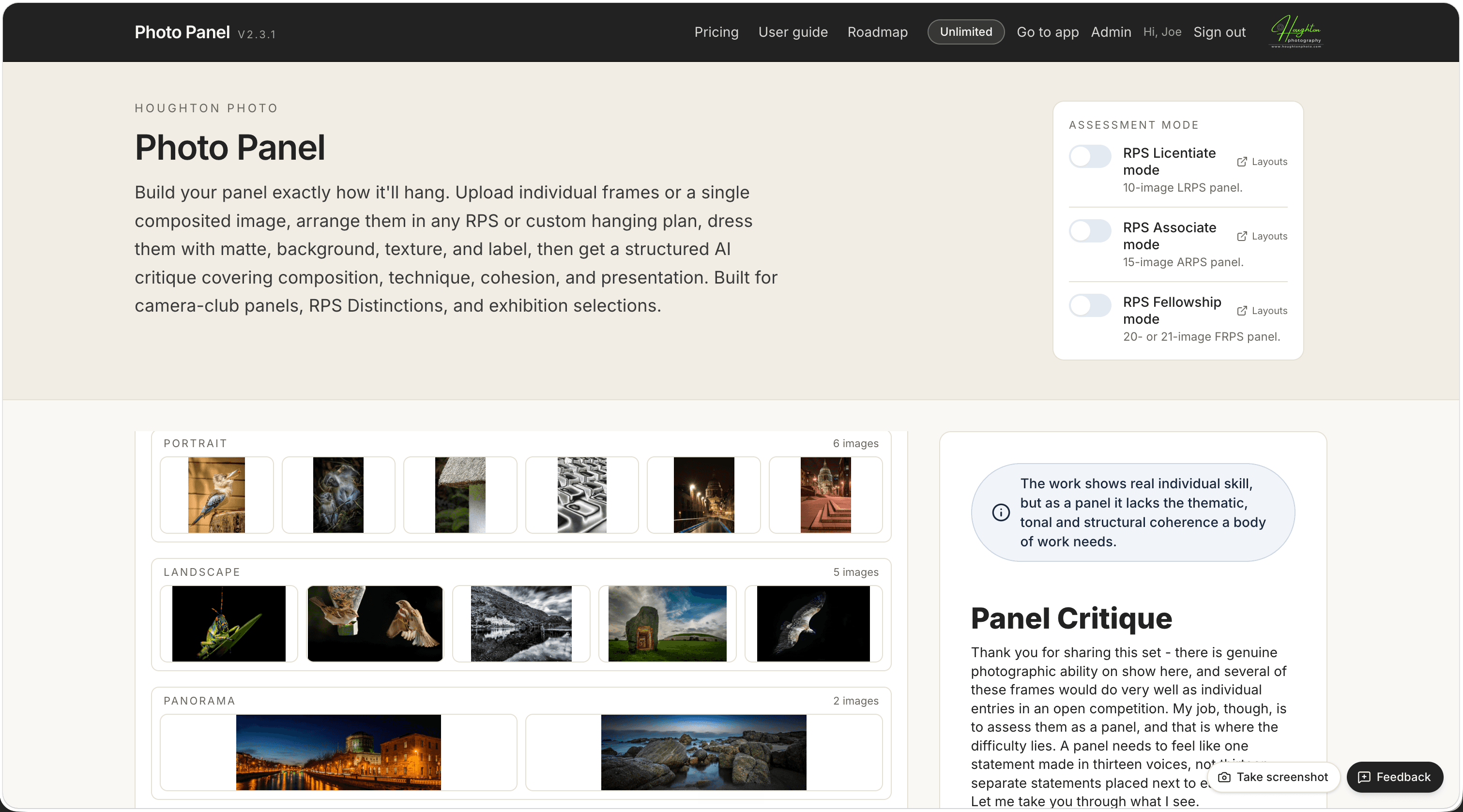
Photo Panel showing an RPS assessment mode panel with the AI critique on the right

How it works

Three steps from upload to critique.

  1. 01

    Upload your panel

    Drop in individual frames, or a single composited image. JPEG, PNG, or WebP. Up to 30 frames per panel.

  2. 02

    Arrange how it'll hang

    Use an RPS Licentiate, Associate, or Fellowship template, pick from curated custom layouts, or drag images freely on a freeform canvas. Add matte, background texture, border, and a panel label.

  3. 03

    Get a structured critique

    Each critique opens with a verdict (strong, developing, or not there yet) and walks through composition, technique, cohesion, and presentation. The whole panel is in front of the AI, so it sees how each frame works in the set.

What you can do

The whole pipeline, in one place.

Layout

RPS-accurate hanging plans, plus freeform

Every official RPS layout template for Licentiate (6), Associate (5), Fellowship 20-image (4), and Fellowship 21-image (2). Or build a general panel of any size from 2 to 30 frames and choose from curated arrangements. Or skip plans entirely and place each image by hand on a freeform canvas.

Appearance

Dress the panel before the AI sees it

Matte width and colour, optional keyline, panel background, uploadable background texture with opacity, outer border, image scale slider, and a panel label (title, author, font size, colour, opacity) above or below the wall.

Critique

Reads the whole set, frame by frame

Powered by Claude Opus, the strongest model available for visual judgement. Each frame is sent at full resolution. The critique sees how a single image works within the larger panel - sequencing, repetition, rhythm, balance.

Export

Branded PDFs for the critique and the layout

Both the critique and the composited panel layout export as A4 PDFs on Houghton Photo letterhead. Print one for your reviewer, the other for your wall planner.

History

Save critiques and revisit them any time

Click Save to history after any critique and it lands in your personal archive. Read it in full, download a fresh PDF at any time, or delete it when you're done. Your critique history stays in your account as long as you need it.

Workflow

Lightroom Classic plug-in

Select images in Lightroom Classic, hit Send to Photo Panel, and the frames load straight into the web app. No re-export, no upload step.

What you get back

An honest read, by an objective AI judge.

Every critique opens with a verdict pill (strong, developing, or not there yet) and a one-line summary. Then sections covering composition, technique, cohesion, and presentation. Specific to the frames you uploaded, in the layout you arranged.

The example on the right is a real critique format - not a mock-up.

Developing

A coherent set with clear intent. The light handling is the most assured element. The sequencing and a couple of weaker frames are holding the panel back from full Licentiate strength.

Composition

Frames 2, 5, and 8 are doing the heavy lifting here. The triangular composition in frame 5 is particularly assured - the leading line from bottom-left to upper-right ties the foreground rocks to the headland and gives the eye somewhere to go.

Frames 3 and 7 read as similar in colour, texture, and subject matter. Consider replacing one with something that contrasts in tonality or in scale - a wide vista or an intimate detail. The panel currently sits in one register and would benefit from a wider tonal range.

Technique

Exposure and white balance are consistent across the set, which is unusual and welcome. The light direction in each frame matches the time of day implied by the others, which keeps the panel feeling like a coherent shoot rather than a stitched compilation.

Cohesion

The thread is clear: light on water. Frame 6, however, doesn't pull its weight on this thread - the subject is interesting but the light isn't the protagonist. Consider whether it earns its place in a panel about water and light specifically.

Pricing

Pay as you go. No subscription.

Most photographers prepare a handful of panels per year, not per month. A subscription would be unfair for that. Credits never expire and stay valid at the rate you bought them at, even if prices change.

Full pricing details
£05 critiques on signupFree
No card required.
£1020 creditsStarter Pack
One-time. Equivalent to 50p per critique.
50pper creditTop-up
Add 10 credits for £5, 20 for £10, and so on. Buy whenever you need more.

Frequently asked

Likely questions.

What does it actually cost?
Five free critiques on signup. After that, £10 for a Starter Pack of 20 credits, or top-up at 50p per credit (10 credits = £5). No subscription, no card on file until you buy.
What's a credit?
One critique equals one credit. Whether you're sending a single composited image or a 30-frame panel, it costs one credit.
Will the AI critique guarantee my panel passes?
No, and we wouldn't claim it does. The critique is one perspective among many. Treat it as a structured second opinion before you submit, not as a substitute for human review.
Is my image stored anywhere?
No. Photographs are held in memory only for the duration of the critique request and discarded the moment Claude responds. Your panel images never touch our database or object storage. See the privacy notice for the full data picture.
Why Claude Opus, specifically?
Because the difference shows in this kind of work. Visual judgement on a multi-frame panel is exactly where the most capable models pull away. We use the model that gives you the most useful critique, not the cheapest one to run.

Ready to test your panel?

Five critiques on the house. Sign up takes a minute.